


- News
- All News
- Mobiles
- Laptops
- Watches
- Cameras
- Printers
- Refrigerators
- Televisions
- Air Conditioners
- Washing Machines
- Air Purifiers
- Water Purifiers
- Expert Reviews
- All Reviews
- Mobiles
- Laptops
- Watches
- Cameras
- Printers
- Refrigerators
- Televisions
- Air Conditioners
- Washing Machines
- Air Purifiers
- Water Purifiers
- Articles
- All Articles
- Mobiles
- Laptops
- Watches
- Cameras
- Printers
- Refrigerators
- Televisions
- Air Conditioners
- Washing Machines
- Air Purifiers
- Water Purifiers
- Videos
- Videos

Ad
Asus Zenbook 14 UM3406G Review: All New Thin and Light Ai Laptop


on Google
on Google

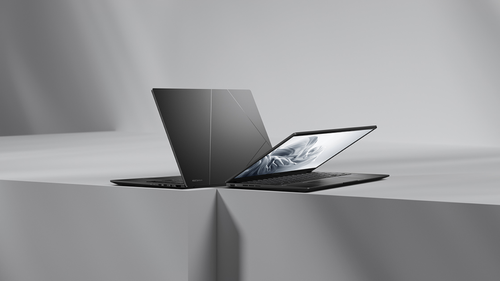
The Asus Zenbook 14 UM3406G keeps the series' slim profile, measuring just 14.9mm thick and weighing 1.28kg. This makes it easy to slip into a backpack for commutes or travel. The body uses anodized aluminum alloy, giving it a smooth, matte black finish in Jade Black color. It feels sturdy in hand, with no flex when you press on the keyboard deck or lid. Asus added MIL-STD-810H certification, so it can handle bumps, drops from desk height, and even some humidity—great for students or office workers on the move.
Ports are well-placed for quick access. On the left, you find two USB-C ports (one supports USB 4 for fast data and display output), an HDMI 2.1 for external monitors, and a headphone jack. The right side has a USB-A 3.2 port for older devices. No SD card slot, but the USB-C covers most needs. The hinge opens to 180 degrees, useful for sharing screens during meetings.
One small issue: the fingerprint-prone finish shows smudges easily on the lid and touchpad. A quick wipe with a microfiber cloth fixes it, but you might need to clean often. Compared to the new Zenbook S16's larger Ceraluminum chassis (1.5kg, 11mm thick), the UM3406G feels more pocket-friendly for solo users.
Overall, the design nails portability without skimping on quality, scoring high for everyday carry.
Asus Zenbook 14 UM3406G Display: Sharp OLED for Work and Media
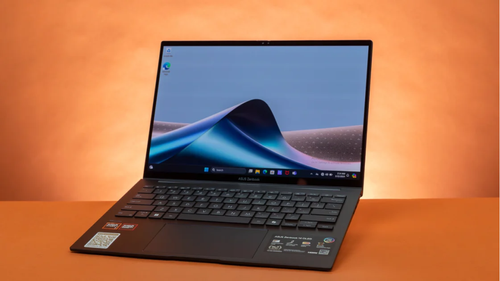
The 14-inch 3K OLED touchscreen is a highlight in this Asus Zenbook 14 review. At 2880x1800 resolution, it packs over 243 pixels per inch for crisp text and images—perfect for editing docs or browsing photos. The 16:10 aspect ratio gives extra vertical space for spreadsheets or coding. Colors pop with 100% DCI-P3 coverage, and the 1,000,000:1 contrast ratio makes blacks deep and videos immersive. It's Pantone-validated for accurate hues, ideal if you do light photo work.
Brightness hits 500 nits peak in HDR mode, but everyday use tops at 400 nits. The glossy finish boosts vibrancy indoors but causes glare outdoors or near windows. At 60Hz refresh rate, scrolling feels smooth for office tasks, though gamers might miss higher rates like the 120Hz on Zenbook S16. Touch input works well with stylus support (sold separately), and the MyAsus app lets you tweak color modes or eye care settings to reduce blue light.
In real use, watching Netflix or editing in Canva looks stunning, but direct sunlight dims visibility. Compared to the Lenovo Yoga Slim 7i's IPS panel, the OLED here wins for richness, though it's pricier.
This screen suits hybrid workers who value quality over raw brightness.
Asus Zenbook 14 UM3406G Keyboard, Touchpad, Speakers, and Webcam: Comfort for Long Sessions
Typing on the backlit ErgoSense keyboard feels natural with 1.4mm key travel and good spacing. Keys are quiet and responsive, reducing fatigue during emails or reports. The white backlight adjusts in low light, and a dedicated Copilot key launches AI tools fast. No numpad built-in, but the touchpad doubles as one via NumberPad 2.0—handy for quick math in Excel.
The glass touchpad is large (120x70mm) and supports multi-finger gestures like three-finger app switching. Precision drivers make cursor control accurate, even for detailed tasks.
Speakers are dual Harman Kardon-tuned with Dolby Atmos. They deliver clear mids for calls and decent volume, but bass is light—pair with headphones for music. The 1080p IR webcam with privacy shutter handles video calls well in dim rooms, thanks to AI noise reduction. Face unlock via Windows Hello works most times, though occasional lighting glitches happen.
For audio pros, it's average; the Zenbook S16's six-speaker setup sounds fuller. Still, for Zoom or Teams, it's reliable.
Asus Zenbook 14 UM3406G Software and Features: AI Boosts Productivity
Out of the box, it runs Windows 11 Home with Copilot+ PC certification. The Ryzen AI NPU (up to 50 TOPS) powers features like live captions and Studio Effects for better video calls. Copilot summarizes notes or generates ideas—useful for brainstorming. Asus apps like MyAsus handle updates, diagnostics, and fan curves, while ScreenXpert splits windows for multitasking.
No bloatware overloads startup, keeping things snappy. Battery health tools limit charge to 80% for longevity. In daily use, AI helps with quick searches or photo organization via StoryCube. It's more intuitive than older Zenbooks, aligning with 2026's AI trend seen in HP OmniBook X Flip 14.
Security includes TPM 2.0 and optional fingerprint (not on this model). Updates are seamless, with three years of Windows support.
Asus Zenbook 14 UM3406G Performance: Smooth for Work and Light Games
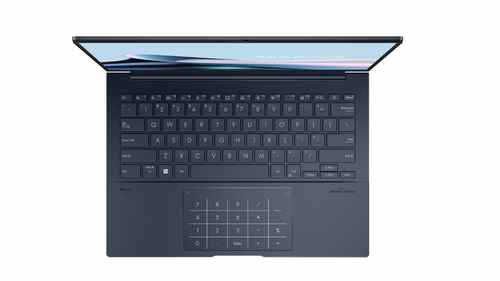
The AMD Ryzen AI 5 430 (2.2GHz base, up to 5GHz boost) with Radeon Graphics tackles office apps, web tabs, and 4K video edits effortlessly. 16GB RAM and 1TB SSD ensure quick boots (under 10 seconds) and app launches. For creators, it handles Photoshop or Premiere basics without lag.
In benchmarks, it holds steady against rivals:
Asus Zenbook 14 UM3406G Benchmark Scores Table
| Benchmark | Asus Zenbook 14 UM3406G | HP OmniBook X Flip 14 | Lenovo Yoga Slim 7i Aura Edition | Asus Zenbook S16 (Recent Launch) |
|---|---|---|---|---|
| Cinebench R23 Single-Core | 1,698 | 1,876 | 1,850 | 2,100 |
| Cinebench R23 Multi-Core | 6,421 | 9,150 | 10,467 | 14,500 |
| Geekbench 6 Single-Core | 2,381 | 2,750 | 2,690 | 2,900 |
| Geekbench 6 Multi-Core | 7,425 | 11,189 | 11,119 | 15,200 |
| PCMark 10 | 6,121 | 7,198 | 7,253 | 7,800 |
| 3DMark Night Raid | 17,456 | 32,098 | 33,860 | 25,000 |
| CrystalDiskMark Read/Write | 6,973 / 6,074 MB/s | 6,993 / 5,796 MB/s | 6,151 / 4,663 MB/s | 7,200 / 6,500 MB/s |
Multi-core scores lag behind Intel rivals due to thermal limits, but single-core speed shines for browsing. Gaming? Titles like Valorant run at 60fps on low settings; heavier games like Cyberpunk need tweaks. Four modes (Whisper, Standard, Performance, Speed) balance noise and power—Whisper keeps fans silent for calls.
Thermals stay cool: under 40°C on lap during docs, up to 45°C in stress tests. Compared to Zenbook S16's beefier Ryzen AI 9, the UM3406G is for productivity, not rendering farms.
In real tests, juggling 20 Chrome tabs, Word, and Spotify used 40% battery in four hours—no stutters.
Asus Zenbook 14 UM3406G Battery Life: All-Day Power
The 75Wh battery shines, lasting 16-18 hours for video playback or 8-10 hours mixed use (web, docs, light edits). Fast 65W USB-C charging hits 60% in 45 minutes. Users report 7 hours heavy work, outpacing many 14-inch laptops. AI optimizations like adaptive brightness help stretch it further.
In coffee shop runs, it powered through mornings without plugs. Versus Yoga Slim 7i (12 hours), it's a winner for travelers.
Pros and Cons of Asus Zenbook 14 UM3406G
| Pros | Cons |
|---|---|
| Lightweight and durable build | Glossy screen causes glare |
| Vibrant 3K OLED display | 60Hz refresh feels basic |
| Excellent battery endurance | Smudge-prone finish |
| Smooth AMD Ryzen AI performance | Average speakers lack bass |
| AI features enhance workflow | No dedicated numpad |
Also Read: Realme P4 Power 5G First Impressions: Massive Battery and Power
Asus Zenbook 14 UM3406G Verdict: Solid Pick for Portability
The Asus Zenbook 14 UM3406G earns its spot as a best thin and light AMD Ryzen AI laptop in India 2026. At ₹1,15,990, it offers premium feel, long battery, and capable speed for professionals, students, or remote workers. The OLED screen and build quality shine, though glare and fingerprints are minor gripes. If you need more screen real estate, eye the Zenbook S16; for budgets, it's hard to beat.
Comparos Says: The Asus Zenbook 14 UM3406G blends style, stamina, and smarts—ideal for on-the-go users chasing reliable performance without the bulk.
Ad
Ad
Confused? Choose Your Phone
What Matters Most


Get TheWeekly Brief
One email each morning: the launches,
the price changes and the reviews
worth reading.

Ad
Ad
 |
|
807, 808, 8th Floor,
IRIS Tech Tower Sohna Road Sector 48,
Gurugram, Haryana - 122018