




Ad
Expert Reviews
Hasselblad Releases Phocus Mobile App for Android with Advanced Editing Features



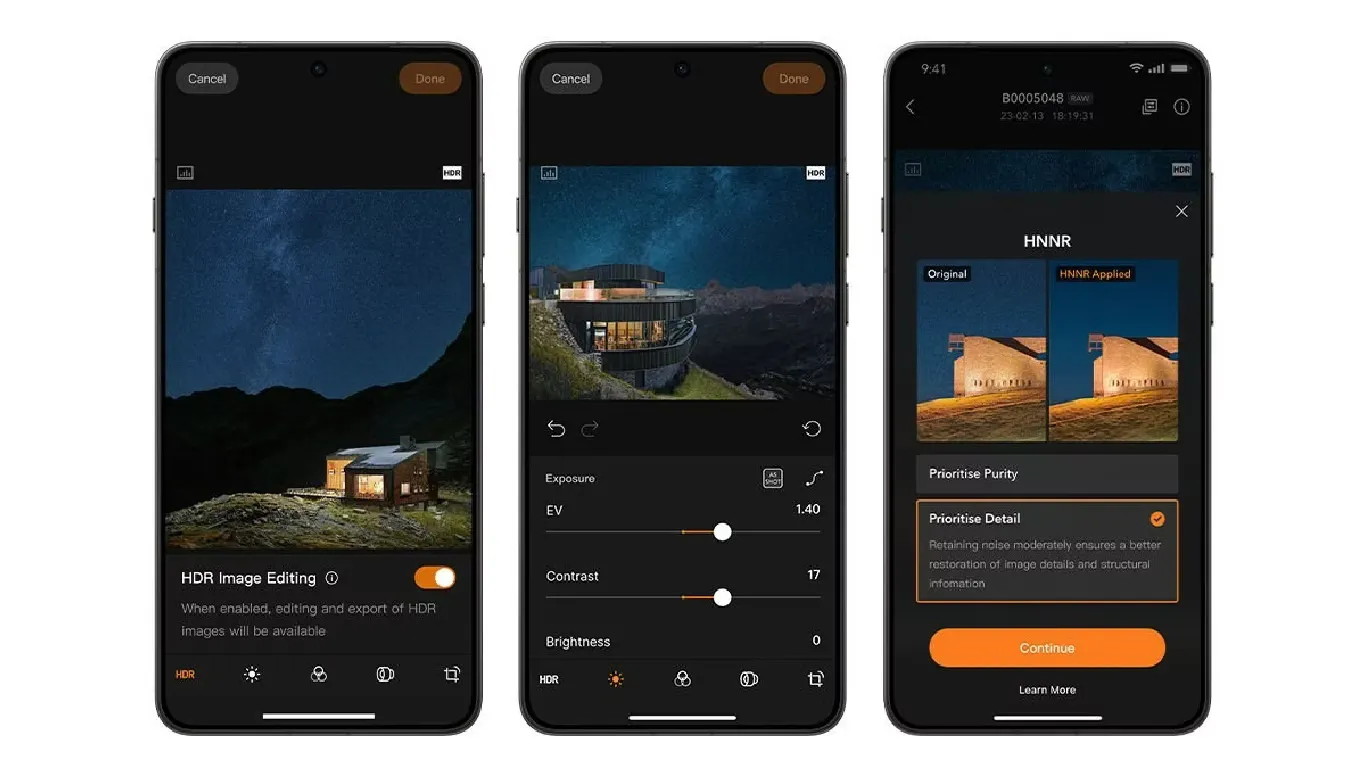
Hasselblad has launched the Phocus Mobile app for Android, expanding its mobile editing capabilities beyond iOS for the first time in 16 years. The app supports the Hasselblad X2D II, X2D 100C, and 907X & CFV 100C cameras. It brings the full Hasselblad Natural Color Solution (HNCS) workflow to Android devices, offering AI-powered noise reduction, a comprehensive editing suite, and advanced photo management tools.
Key Highlights
- Hasselblad launches Phocus Mobile app for Android after 16 years of iOS exclusivity.
- Supports X2D II, X2D 100C, and 907X & CFV 100C cameras with full HNCS workflow.
- AI-powered RAW noise reduction processes 100MP images in 15 to 20 seconds.
- Editing tools include exposure, curves, white balance, and batch processing features.
Key Features and Compatibility
Phocus Mobile for Android allows users to review, edit, organize, and export images directly from their devices. The app preserves colors, tonal gradations, and highlight details from preview through export. On Android devices with HDR support, images captured with the X2D II 100C display intricate shadow detail, luminous highlights, and color gradations that closely match real-life visuals, according to Hasselblad.
The app’s AI-powered RAW noise reduction algorithm enhances image quality in low-light conditions and at high ISOs. It produces cleaner, more natural-looking images while maintaining fine details. Processing a 100MP RAW image with this feature typically takes between 15 and 20 seconds.
Editing Tools and Workflow
Phocus Mobile for Android includes a full suite of editing tools. Users can adjust exposure, curves, and white balance, and apply monochrome correction, lens correction, and noise reduction. The app also supports sharpening, cropping, rotation, and keystone correction. Batch processing is available, allowing users to apply settings to multiple images at once.
The noise reduction feature offers two modes: Purity Mode, which focuses on suppressing noise, and Detail Mode, which preserves luminance noise to retain fine image details. This gives photographers flexibility based on their editing needs.
Images can be imported into the app via Wi-Fi or USB-C cable. Export options include JPG, TIFF, HEIF, 3FR, and RAW formats, providing compatibility with various workflows and storage preferences.
Enhanced Mobile Photography Experience
The release of Phocus Mobile for Android marks a significant step for Hasselblad, making advanced mobile editing accessible to a wider range of users. The app delivers an end-to-end workflow for photographers who use Hasselblad’s supported cameras, ensuring that image quality and color accuracy are maintained throughout the editing process.
By combining AI-powered features with a robust set of editing tools, Phocus Mobile for Android aims to meet the needs of professional and enthusiast photographers alike. The app’s support for high-resolution RAW files and advanced export options further enhances its utility for mobile-based photo editing.
Follow Us:



Ad
Recent News

Flipkart to Launch Online Food Delivery Service, Expanding Beyond Quick Commerce
24-Jul-2026 01:30 PM

Delhi Police Use AI Facial Recognition Vans at Jantar Mantar Protests
24-Jul-2026 12:30 PM

Oppo A7 Pro Max Appears on Geekbench With Snapdragon 4 Gen 5 and 12GB RAM
24-Jul-2026 12:30 PM

Google Introduces Selfie Video Login for Account Access
24-Jul-2026 11:30 AM

DeepSeek CEO Liang Wenfeng Outlines AGI Vision and China’s AI Chip Strategy
24-Jul-2026 10:30 AM

IBM Shares Drop $70 Billion After Earnings Miss and AI Concerns
24-Jul-2026 09:30 AM
Ad
Reviews & Guides
View All


Samsung Galaxy Buds 4 Pro Review: क्या ₹22,999 में मिलते हैं सबसे बेहतरीन प्रीमियम वायरलेस ईयरबड्स?

कंटेंट क्रिएटर के लिए सबसे दमदार बैटरी लाइफ वाले Windows लैपटॉप, 18 घंटे की मिलेगी बैटरी लाइफ

Samsung Galaxy S26 Ultra क्यों है साल का सबसे बेहतरीन स्मार्टफोन? जानें 5 बड़े कारण

MacBook Neo Review: सस्ता नहीं, Apple का मास्टरस्ट्रोक है ये Laptop!

Samsung Galaxy S26 Ultra Review: AI से लेकर प्राइवेसी डिस्प्ले है सबसे खास, जानें कैसी है परफॉरमेंस

Vivo V70 Elite Review 2026: Price in India, Specs, Features

Samsung has unveiled its first credit card, Earn 5% back

5 Anti-Scam Tools on WhatsApp that protect you from Digital Fraud

How Samsung’s Galaxy S26 Series is Democratizing Mobile Filmmaking

30,000 से कम आने वाले बेस्ट स्मार्टफोन, 4K वीडियो शूट और फुल डे बैटरी लाइफ

Why switch to iPhone These Reasons Will Convince You Instantly

Haier Launches F11, India’s Only Ultra Fresh Air Technology Washing Machine with Full AI Color Touch Panel








Ad
 |
|
807, 808, 8th Floor,
IRIS Tech Tower Sohna Road Sector 48,
Gurugram, Haryana - 122018