



Ad
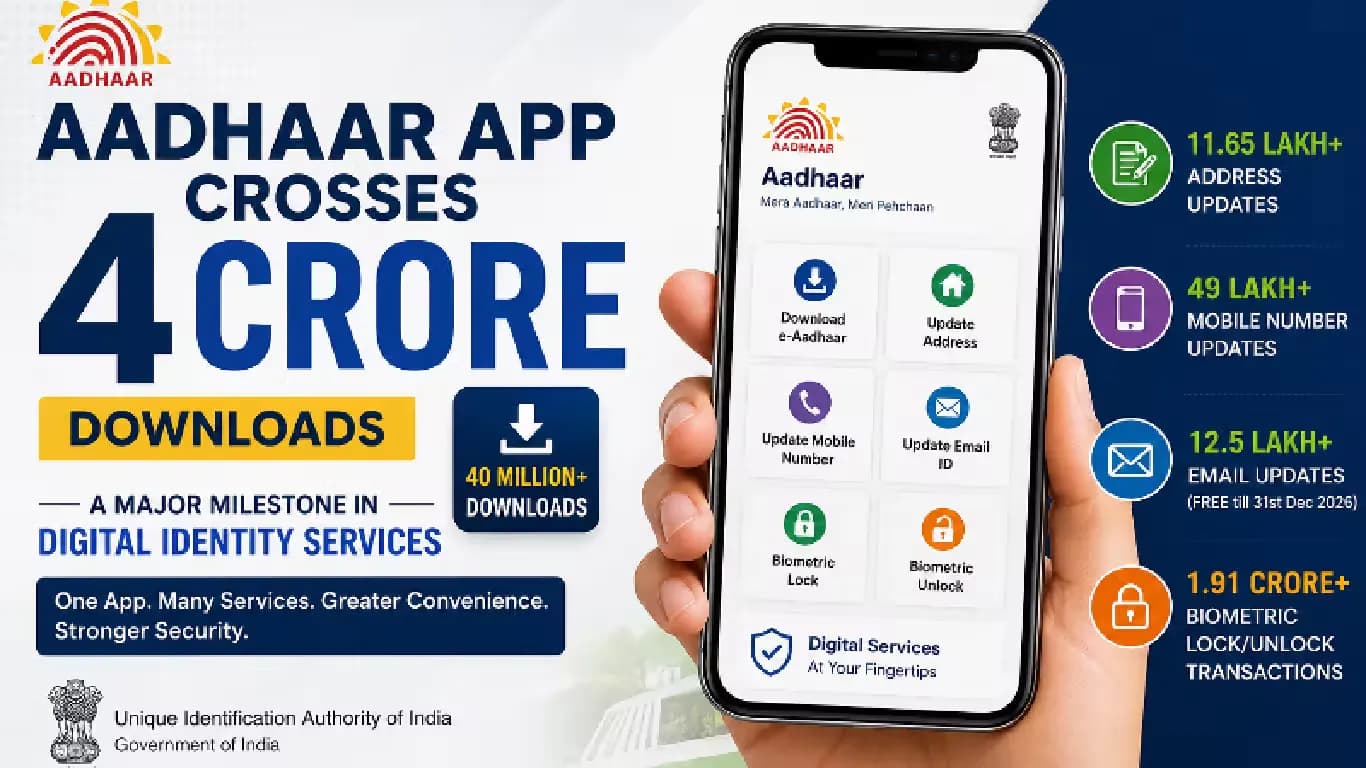
Aadhaar App Sees Surge in Biometric Lock Usage, Crosses 4 Crore Downloads



Follow Us:


4,933 views
More Aadhaar holders are securing their biometric data than before, according to a recent press release from the Ministry of Electronics and Information Technology (MeitY) on July 18. The Aadhaar App has now surpassed four crore downloads. Its Biometric Lock and Unlock feature has been used over 1.91 crore times to date.
Key Highlights
- Aadhaar App has surpassed four crore downloads as of July 18.
- Biometric Lock and Unlock feature used over 1.91 crore times by Aadhaar holders.
- Feature allows users to lock fingerprint, iris, and facial authentication for added security.
- Only Aadhaar holders with registered mobile numbers can use the Biometric Lock feature.
Biometric Lock Feature Details
The Biometric Lock is a security tool that allows Aadhaar holders to lock their fingerprint, iris, and facial authentication linked to their Aadhaar number. Locking biometrics prevents their use in Aadhaar authentication until the user unlocks them again. This feature adds a significant layer of protection against misuse and enhances privacy.
Only Aadhaar holders with a registered mobile number can use the Biometric Lock feature. If someone tries to authenticate using locked biometrics, the request fails and returns error code "330," indicating the biometrics are currently locked. This ensures no individual or organization can access the biometric data while the lock is active.
How to Lock or Unlock Biometrics
There are two main ways to lock or unlock biometrics through the Aadhaar App. The first method involves opening the Aadhaar App, logging in with a 6-digit PIN, and tapping the "Biometric Lock/Unlock" option below the Aadhaar card on the home screen. Users can confirm their choice to lock or unlock biometrics as needed.
The second method is through the app's Security section. After signing in, users tap the Security tab on the home screen, select Biometric Lock/Unlock, and confirm their action. When biometric authentication is needed for a service, users can revisit the same option to unlock their biometrics.
Security and Privacy Benefits
MeitY stated, "This feature empowers Aadhaar number holders with greater control over their personal information by allowing them to instantly lock or unlock their biometrics whenever required, adding an extra layer of security with just a few taps."
Biometric authentication is widely used to verify identity for Aadhaar-enabled services. Locking biometrics when not in use helps reduce the risk of unauthorized access. This simple step can protect users from potential misuse of their biometric data.
The increasing use of the Biometric Lock feature reflects growing awareness about privacy and security among Aadhaar holders. With over four crore downloads and more than 1.91 crore uses of the lock feature, more people are taking steps to safeguard their personal information.
Latest News



Reviews & Guides
View All


Samsung Galaxy Buds 4 Pro Review: क्या ₹22,999 में मिलते हैं सबसे बेहतरीन प्रीमियम वायरलेस ईयरबड्स?

कंटेंट क्रिएटर के लिए सबसे दमदार बैटरी लाइफ वाले Windows लैपटॉप, 18 घंटे की मिलेगी बैटरी लाइफ

Samsung Galaxy S26 Ultra क्यों है साल का सबसे बेहतरीन स्मार्टफोन? जानें 5 बड़े कारण

MacBook Neo Review: सस्ता नहीं, Apple का मास्टरस्ट्रोक है ये Laptop!

Samsung Galaxy S26 Ultra Review: AI से लेकर प्राइवेसी डिस्प्ले है सबसे खास, जानें कैसी है परफॉरमेंस

Vivo V70 Elite Review 2026: Price in India, Specs, Features

Apple AirPods 5: Price in India, Features and Specifications

Haier Smart TV Review 2026: Is It Worth Buying?

Best 55-Inch TVs Under ₹50,000 in India

Best 5 AI TVs in India – LG, Samsung, Sony & TCL Compared

Best Phone Under ₹10,000 for Elderly and Senior Citizens

Haier 32, 43 & 55 Inch LED TV: Full Specifications & Price Comparison