


- News
- All News
- Mobiles
- Laptops
- Watches
- Cameras
- Printers
- Refrigerators
- Air Conditioners
- Washing Machines
- Air Purifiers
- Water Purifiers
- Expert Reviews
- All Reviews
- Mobiles
- Laptops
- Watches
- Cameras
- Printers
- Refrigerators
- Air Conditioners
- Washing Machines
- Air Purifiers
- Water Purifiers
- Articles
- All Articles
- Mobiles
- Laptops
- Watches
- Cameras
- Printers
- Refrigerators
- Air Conditioners
- Washing Machines
- Air Purifiers
- Water Purifiers
- Videos
- Videos

Ad
How to Upgrade Your Home Printer for Wireless Scanning: Epson EcoTank Tips 2026

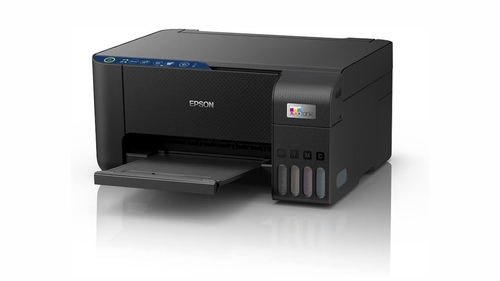
These models launched or updated in 2025-2026 support wireless scanning. Prices are approximate in INR and may vary by store.
| Model Name | Key Features | Scanning Resolution | Print Speed (Black/Color PPM) | Price Range (Approx. INR) | Best For |
|---|---|---|---|---|---|
| Epson EcoTank ET-4950 | Wireless, auto duplex scanning, 2.4-inch touchscreen, fax, auto document feeder | Up to 1200 dpi | 15/8 | ₹25,000–₹35,000 | Home offices with lots of documents |
| Epson EcoTank ET-3950 | Wireless, auto duplex printing/scanning, high ink yield | Up to 1200 dpi | 15/8 | ₹20,000–₹30,000 | Busy families scanning photos and forms |
| Epson EcoTank ET-2980 | Compact wireless, voice-activated, mobile app support | Up to 1200 dpi | 10/5 | ₹15,000–₹25,000 | Small homes or first-time users |
| Epson EcoTank ET-5850 | Pro series, wireless, high-capacity trays, auto feeder | Up to 2400 dpi | 25/12 | ₹40,000–₹50,000 | Small businesses needing fast scans |
| Epson EcoTank ET-4850 | All-in-one wireless, fast charging ink, app integration | Up to 1200 dpi | 15.5/8.5 | ₹30,000–₹40,000 | Everyday home use with mobile scanning |
| Epson EcoTank ET-2800 | Basic wireless, compact design, easy refill tanks | Up to 1200 dpi | 10/5 | ₹12,000–₹20,000 | Budget setups for simple scanning tasks |
These models use Epson's cartridge-free system, which means fewer trips to buy ink. All support Wi-Fi Direct for direct device connections without a router.
Step-by-Step Guide to Set Up Wireless Scanning on Epson EcoTank
Upgrading to wireless scanning starts with connecting your printer to your home network. Use the Epson Smart Panel app for phones or Epson Scan 2 software for computers. Here's how to do it.
1. Prepare Your Printer and Network
Unbox your Epson EcoTank and plug it in. Fill the ink tanks if needed—follow the quick start guide. Turn on the printer. Check your home Wi-Fi: It should be 2.4GHz (most EcoTank models work best on this). If your router uses 5GHz only, switch to dual-band. Go to the printer's control panel (touchscreen on models like ET-4950) and select Wi-Fi Setup. Choose Wi-Fi Setup Wizard, enter your network name and password using the arrows or keypad. Wait for the connection light to stop flashing. This step takes 2-5 minutes.
2. Install Epson Software on Your Computer
For Windows or Mac, download Epson drivers from the official site. Search for your model (e.g., ET-3950 drivers 2026). Run the installer—it includes Epson Scan 2 for scanning. During setup, select Network Connection. The software will find your printer on the Wi-Fi. Test by placing a document on the scanner glass and clicking Scan. Save files as PDF or JPEG. If using a laptop, ensure it's on the same network.
3. Set Up Mobile Scanning with Epson Smart Panel App
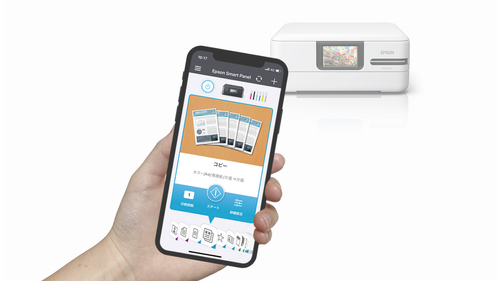
Download the free Epson Smart Panel app from Google Play or App Store. Open it and create an account if prompted. Tap Add Printer, then follow prompts to connect via Wi-Fi. Place your document or photo on the scanner. In the app, select Scan, choose settings like color or black-and-white, and hit Start. The app sends the scan to your phone's gallery or email. For models like ET-2980, it supports voice commands with Alexa or Google Assistant for hands-free starts.
4. Enable Scan to Cloud or Email
In the app or software, go to Scan Settings. Select Scan to Cloud—link to services like Dropbox or OneDrive. For email, add your address. This upgrade lets you scan receipts and send them directly without a computer. On advanced models like ET-5850, use the auto feeder for multi-page docs.
5. Test and Adjust Settings
Scan a test page. Check quality: Adjust resolution to 300 dpi for clear text or 600 dpi for photos. If scans are blurry, clean the glass with a soft cloth. Save presets for common tasks, like "Family Photos" or "Work Forms."
This setup works for most 2025-2026 EcoTank models. If you have an older printer, check for firmware updates to add wireless features.
Tips for Better Wireless Scanning with Epson EcoTank
To make your upgrade smooth, follow these tips based on common user experiences.
- Place the Printer Smartly: Keep it within 10-15 meters of your router for strong signal. Avoid thick walls or microwaves that block Wi-Fi.
- Update Firmware Regularly: Go to the Epson site, enter your model (e.g., ET-4850), and download updates. This fixes bugs and improves speed. Connect via USB first if needed.
- Use Wi-Fi Direct for Quick Scans: On models like ET-2800, hold the Wi-Fi button to enter Direct mode. Connect your phone directly—no router required for on-the-go scans.
- Optimize for Multiple Devices: Add the printer to all home devices. In settings, share it on the network so everyone can scan without switching.
- Save Ink and Paper: EcoTank's high-yield tanks last for 7,500 black pages. For scanning, use preview mode to crop and avoid waste.
- Security Basics: Set a printer password in the control panel to prevent unauthorized access. Use WPA2 on your router.
These tips help avoid setup hassles and keep things running well.
Common Issues and How to Fix Them
Wireless scanning can have hiccups. Here's how to troubleshoot.
- Printer Not Found on Network: Restart printer and router. Check if Wi-Fi channel is 1-11 (EcoTank may not see higher). Re-run setup wizard.
- Scan Software Won't Open: Reinstall Epson Scan 2. Turn off firewall temporarily—add Epson as exception in settings.
- Slow or Failed Scans: Weak Wi-Fi—move closer or use extender. Clear printer queue in computer settings.
- Blurry Scans: Clean scanner glass and rollers. Use correct resolution; don't overload auto feeder on models like ET-4950.
- Mobile App Connection Fails: Update app and phone OS. Ensure Bluetooth is on for initial pairing.
- Error Messages: Note the code (e.g., "Cannot Communicate"). Search Epson support for fixes, like driver updates.
Most issues fix with a restart or update. If stuck, use Epson's online chat.
Also Read: 2026 Renault Duster VS Old Renault Duster: Differences Explained
Trends in Home Wireless Scanning 2026
Home printing is changing fast. In 2026, wireless features are standard, with apps making scans smarter. Epson EcoTank leads with eco-designs—less plastic waste from cartridges. Trends include:
- Mobile-First Setup: Apps like Smart Panel make upgrades easy, no CDs needed.
- Cloud Integration: Scan and store online for access anywhere.
- AI Enhancements: Some models auto-fix scan quality or organize files.
- Sustainability Focus: Refillable tanks cut costs and environmental impact.
- Multi-Device Support: Families share one printer via Wi-Fi.
These shifts make home offices more efficient.
Choosing the Right Epson EcoTank Model for Your Scanning Needs
Pick based on what you scan most. Here's a quick guide.
| Use Case | Best Model | Why |
|---|---|---|
| Daily documents and emails | ET-4950 | Auto feeder for quick multi-page scans |
| Family photos and artwork | ET-3950 | High resolution for clear images |
| Budget basic scanning | ET-2800 | Simple wireless, low price |
| Small business reports | ET-5850 | Fast speed and large trays |
| Mobile-heavy users | ET-4850 | Strong app support for phones |
| Compact space | ET-2980 | Small size with full features |
Consider your budget and scan volume. Start with ink yield—higher for heavy use.
Also Read: Brother MFC-J5855DW Printer Review 2026
Final Thoughts
Upgrading to wireless scanning with Epson EcoTank is straightforward and pays off in convenience. From setup in minutes to daily tips, you'll save time and hassle. Models like the ET-4950 or ET-2800 fit most homes, offering clear scans without high costs. In 2026, this tech keeps your digital life organized—whether for work, school, or fun.
Comparos Says: Wireless scanning on Epson EcoTank turns your home printer into a smart helper. Follow these steps for an easy upgrade, and enjoy cable-free freedom every day.
Ad
Ad
Confused? Choose Your Phone
What Matters Most


Get TheWeekly Brief
One email each morning: the launches,
the price changes and the reviews
worth reading.

Ad
Ad
 |
|
807, 808, 8th Floor,
IRIS Tech Tower Sohna Road Sector 48,
Gurugram, Haryana - 122018