


- News
- All News
- Mobiles
- Laptops
- Watches
- Cameras
- Printers
- Refrigerators
- Air Conditioners
- Washing Machines
- Air Purifiers
- Water Purifiers
- Expert Reviews
- All Reviews
- Mobiles
- Laptops
- Watches
- Cameras
- Printers
- Refrigerators
- Air Conditioners
- Washing Machines
- Air Purifiers
- Water Purifiers
- Articles
- All Articles
- Mobiles
- Laptops
- Watches
- Cameras
- Printers
- Refrigerators
- Air Conditioners
- Washing Machines
- Air Purifiers
- Water Purifiers
- Videos
- Videos

Ad
Microsoft Introduces 'Rewrite' AI Tool in Notepad for Effortless Text Refinement


Key Highlights:
- Microsoft introduces the "Rewrite" AI tool in Notepad for text rephrasing, tone adjustment, and length modification.
- Available in preview mode for Windows Insiders and select Microsoft 365 subscribers.
- Users can refine their writing with ease by generating three alternate versions of selected text.
- AI-driven tool comes with content filters to ensure respectful language and privacy protection.
Microsoft Adds New AI Tool in Notepad to Refine Your Writing with Ease
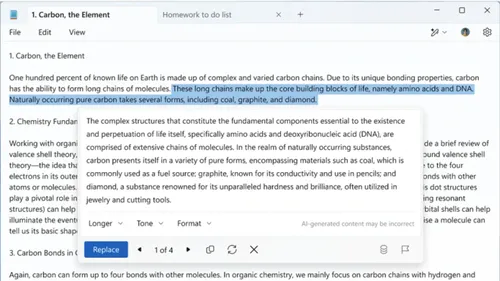
Microsoft is enhancing the classic Notepad application by introducing a new AI-powered feature called "Rewrite." This tool enables users to effortlessly improve and personalize their text, whether they need to rephrase a sentence, adjust the tone, or shorten a paragraph. Currently available in preview for Windows Insiders, Rewrite brings advanced AI capabilities to the everyday text editor, making it more than just a tool for note-taking.
The Rewrite feature leverages GPT-based technology to generate three alternate versions of any selected text, allowing users to choose the one that best fits their needs. Whether you want to make your writing sound more formal, casual, or professional, or simply condense a lengthy paragraph, Rewrite provides a variety of options to refine your text with minimal effort.
To use the feature, users can highlight the text they wish to modify, right-click to open the Rewrite menu, or click on the Rewrite button in the toolbar. Alternatively, the shortcut (Ctrl + I) can be used to bring up the tool instantly. Once the text is rephrased, users can review the three generated versions and select the one that fits their style best.
Currently, Rewrite is available to Windows Insiders on Windows 11, specifically in the Canary and Dev channels. Additionally, users in regions like the United States, UK, Canada, France, Germany, and Italy can access it via the Insider Program. For Microsoft 365 subscribers in select regions such as Australia, New Zealand, and Singapore, the feature is also accessible, with a set number of monthly AI credits included. Users with a Microsoft 365 Personal or Family plan receive 60 credits per month, while those with the Copilot Pro plan can get more credits.
For privacy and security, Microsoft ensures that the Rewrite feature processes user requests through a secure online service and that no text or generated content is stored. Microsoft also includes content filters to prevent harmful or inappropriate text from being generated, offering users a respectful and safe experience.
By integrating the Rewrite feature into Notepad, Microsoft is making advanced text editing accessible to all users, empowering them to refine and personalize their writing effortlessly.
Why Try the New 'Rewrite' Feature?
- Ease of Use: Simplify your writing process with just a few clicks.
- Customization: Tailor your text to match any tone—casual, formal, or professional.
- Privacy Focused: Secure AI service with no storage of user data.
- Accessibility: Available for Windows Insiders and Microsoft 365 subscribers with flexible AI credits.
Microsoft's Rewrite feature in Notepad is an exciting step toward integrating AI tools into everyday applications, making text editing smarter and more efficient for everyone.
Ad
Ad
Confused? Choose Your Phone
What Matters Most


Get TheWeekly Brief
One email each morning: the launches,
the price changes and the reviews
worth reading.

Ad
Ad
 |
|
807, 808, 8th Floor,
IRIS Tech Tower Sohna Road Sector 48,
Gurugram, Haryana - 122018