


- News
- All News
- Mobiles
- Laptops
- Watches
- Cameras
- Printers
- Refrigerators
- Air Conditioners
- Washing Machines
- Air Purifiers
- Water Purifiers
- Expert Reviews
- All Reviews
- Mobiles
- Laptops
- Watches
- Cameras
- Printers
- Refrigerators
- Air Conditioners
- Washing Machines
- Air Purifiers
- Water Purifiers
- Articles
- All Articles
- Mobiles
- Laptops
- Watches
- Cameras
- Printers
- Refrigerators
- Air Conditioners
- Washing Machines
- Air Purifiers
- Water Purifiers
- Videos
- Videos

Ad
Samsung Galaxy S26 Ultra Privacy Display Explained: How It Works

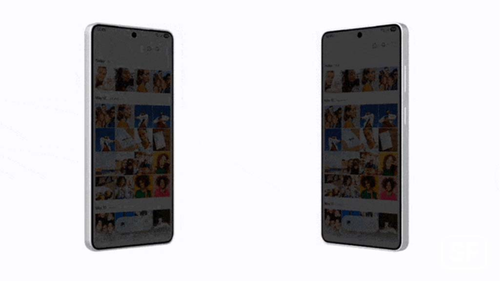
Flex Magic Pixel is the tech behind the privacy display. It's a new way Samsung designs the pixels in the OLED screen. Pixels are tiny lights that make up your display. In normal phones, they send light out in all directions for wide viewing angles.
In the Galaxy S26 Ultra, Samsung uses two kinds of pixels: wide and narrow.
-
Wide Pixels: These spread light out far, like in regular mode. The screen looks great from any angle, with bright colors and no blur.
-
Narrow Pixels: These focus light straight ahead. When privacy mode is on, the phone switches to these or dims the wide ones. Light doesn't spread to the sides, so from an angle, the screen looks blank or very dim.
This switch happens at the hardware level, meaning it's built into the screen panel. Samsung calls it "Black Matrix" architecture, which helps control light without losing quality. There's no big drop in brightness for the user—just for onlookers.
In tests, this works in both upright (portrait) and sideways (landscape) modes. It has little effect on battery life because it only changes how light moves, not how much power is used. Compared to the Galaxy S25 Ultra's anti-reflective glass, Flex Magic Pixel adds active privacy control.
To turn it on, go to quick settings or the display menu. You can set levels:
-
Partial Mode: Hides things like pop-up notifications but keeps the main screen normal.
-
Maximum Mode: Blocks the whole screen from sides for top security.
Samsung pairs this with AI to detect when to activate it, like spotting a banking app open.
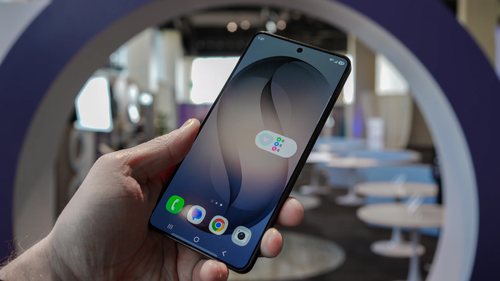
Key Features and Customization Options
The privacy display isn't just on or off—it's smart and easy to set up. Here are the main parts:
-
Auto-Activation: Set it to start when you open apps like your bank or email. It can also kick in for PIN entry or password fields. This is handy for quick tasks without manual toggling.
-
Adjustable Levels: Choose partial for light protection or maximum for full block. Partial is good for notifications, like hiding a text preview.
-
Environment Sensing: The phone uses sensors to adjust based on light around you. In bright rooms, it might tweak the pixels differently.
-
No Quality Loss: Unlike add-on protectors, there's no color shift or dimming for you. The screen stays at up to 2,600 nits brightness.
-
Compatibility: Works with all apps and even videos. It supports the S Pen for note-taking without issues.
Users can customize in settings under "Display" > "Privacy Display." Pick apps, set times, or link to locations like "work" mode.
This builds on features from recent launches. The Galaxy Z Fold 6 from 2025 had multi-angle views, but not privacy like this. The S26 Ultra takes it further for everyday use.
Benefits of Using Privacy Display
Why bother with this? In 2026, phone theft and data leaks are rising. Privacy display helps in real life:
-
Stop Shoulder Surfing: In public transport, no one sees your messages or codes.
-
Protect Work Data: For jobs with sensitive info, like finance or health, it adds a layer of safety.
-
Family Friendly: Hide kid-unfriendly content if they're nearby.
-
Better Than Alternatives: No need to buy extra films that scratch or peel. It's always there and free.
Tests show it blocks views from 30-45 degrees, making text unreadable from sides. Battery hit is under 5% extra per hour in max mode.
Compared to iPhone 17's privacy tools, which are mostly software, Samsung's hardware edge makes it more effective.
Comparisons to Other Recent Smartphone Models
Samsung isn't alone in privacy, but the S26 Ultra leads. Here's how it stacks up:
-
Galaxy S25 Ultra (2025): Had good software locks but no hardware privacy. Screen was bright, but visible from sides.
-
Google Pixel 10 (2025): Uses AI for private mode, but it's app-based, not screen-wide like Flex Magic Pixel.
-
iPhone 17 (2025): Face ID is secure, but no built-in side-block. Relies on dimming or alerts.
-
OnePlus 13 (2025): Has alert sliders, but privacy is basic without pixel control.
The S26 Ultra's feature is unique because it's hardware-first. Other phones might add it in updates, but Samsung got there first in 2026.
Smartphone Privacy Trends in 2026
Privacy is hot in 2026. Here's what's happening:
-
Hardware Over Software: More phones add built-in protections, like Samsung's pixel tech.
-
AI Integration: Phones use AI to spot risks, auto-hiding screens.
-
Biometric Boost: Features work with face or fingerprint for seamless security.
-
Global Rules: New laws push companies to add privacy tools.
-
User Demand: Surveys show 70% want better screen guards against peeks.
Samsung leads with Flex Magic Pixel, but expect rivals like Vivo or Oppo to follow.
Choosing When to Use Privacy Display on Galaxy S26 Ultra
Not sure if you need it? Here's a guide:
| Situation | Best Mode | Why Use It |
|---|---|---|
| Public Transport | Maximum | Blocks side views in crowds |
| Work Meetings | Partial | Hides notifications only |
| Banking Apps | Auto-Activation | Protects PINs and balances |
| Family Time | Manual Toggle | Quick on/off for privacy |
| Low-Light Areas | Environment Sensing | Adjusts for dim rooms |
Start with partial mode to test. If you handle sensitive data, go maximum. It's easy for anyone to set up—no tech skills needed.
Also Read: Apple iPhone 17 vs Samsung Galaxy S26: Price in India, Specifications
Final Thoughts: Why Samsung Galaxy S26 Ultra Privacy Display Matters in 2026
The Samsung Galaxy S26 Ultra privacy display with Flex Magic Pixel changes how we think about phone safety. In a world full of data risks, this feature keeps your screen yours alone. It's simple, effective, and built-in, making the S26 Ultra a top pick for privacy-focused users. Whether you're checking emails or banking on the go, it adds peace of mind without hassle. As phones get smarter, features like this will become standard. For now, Samsung sets the bar high.
*Comparos says: The Samsung Galaxy S26 Ultra's privacy display and Flex Magic Pixel tech make it a standout in 2026, offering real-world protection that's easy to use and hard to beat for keeping your info safe.
Ad
Ad
Confused? Choose Your Phone
What Matters Most


Get TheWeekly Brief
One email each morning: the launches,
the price changes and the reviews
worth reading.
Ad
Ad
 |
|
807, 808, 8th Floor,
IRIS Tech Tower Sohna Road Sector 48,
Gurugram, Haryana - 122018